Thursday, March 8, 2012

Webcast on SharePoint Customization Best Practices

On Wednesday March 14th, Improving Enterprises will be teaming up with Quest Software to help deliver a webcast on SharePoint customization best practices. This is a follow-up to the whitepaper I co-authored last year with SharePoint MCM Mario Fulan. Not only will we be able to elaborate on the topics from the whitepaper, but you’ll also get to see a live demo of some of Quest’s web part products.

Click here to register for this free event!

276843_298846151879_264168_n

Sunday, February 12, 2012

SharePoint ALM with TFS–it does exist

Last week, I presented an overview of the features and uses of Teamimage Foundation Server (TFS) 2010 in a webcast to clients in the UK, in a partnership with Microsoft and Improving Enterprises. When the “About Me” slide appeared, I felt compelled to explain that although I’m one of those SharePoint guys (you know, one of the kool geeks Smile), it was important for them to know that SharePoint development also makes use of application lifecycle management, and in fact makes good use of TFS.

For those that don’t want to take my word for it (why don’t you trust me???) here are a a couple of links that I think you’ll find useful. I’ll refrain from saying “I told you so”…

Monday, January 23, 2012

Deploying a Visual Web Part to your Remote-Hosted Fpweb.net SharePoint Site using Visual Studio 11 (Dev Preview)


(Update: this post also published on Developer Wiki of NothingButSharePoint.com)

The Developer Preview of Visual Studio 11 is now available, and I’ve been exploring its new capabilities, especially as it relates to SharePoint development. Two of the great new features in Visual Studio 11 that I’ll discuss are

  • the ability to deploy visual web parts as sandboxed solutions
  • the ability to automatically deploy sandboxed solutions to remote SharePoint sites

At the end of this article, I’ll explain why I think this is such a big deal. But for now, I’ll walk thru the 3 easy steps necessary to take advantage of these features. In my case, the remote SharePoint site I’ll use is my Fpweb.net Hosted SharePoint account.

Friday, January 20, 2012

InfoPath 2010 presentation at Buckeye SPUG: May the FORMS Be With You…

Last nite I gave my InfoPath 2010 talk to the attendees at the Buckeye SharePoint User Group. Despite a nasty snow storm that swept in inconveniently right at the evening rush hour, lots of folks braved the cold and joined me in an engaging and entertaining talk about the untapped power of InfoPath 2010.

The end of the talk included a demo of a form I created call the Dog Lover’s Application. It’s simply a way to demonstrate some standard, and some not-so-standard, features of InfoPath. I used SharePoint 2010’s imagebuilt-in InfoPath Web Part to embed the form on the homepage of my site. I then asked the audience – “how do you know this isn’t a custom-built web part??” The point I was trying to make is that, with enough clever design, InfoPath forms designers can create some pretty fancy composites that might otherwise normally only be associated with the realm of the all-powerful Developer. : )
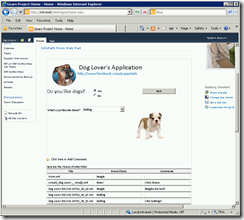
My goal was to hopefully make people see the value that InfoPath delivers as another tool in their SharePoint arsenal, and to show that it can be used for more than just the basic form.

The slidedeck can be found below, or on Slideshare::

Saturday, January 14, 2012

SharePoint spotted at Codemash

image

SharePoint made an appearance at Codemash this year!

This great event is normally light on SharePoint love, but this year I was able to present a 20-minute vendor session for Improving Enterprises that focused on the development features that a [non-SharePoint] developer should know about when contemplating SharePoint development. In my opinion, SharePoint as a dev platform can be a developer paradise because of large collection of tools, libraries, services & utilities at your disposal. And as I’m exploring the Visual Studio 11 Developer Preview (more on that to come), I think many will see that it’s about to get even better.

You can find my slide deck here, and for more info on Codemash, check out the website, or view the very active twitter feed.

Friday, December 30, 2011

A new role in SharePoint, better toys, and all that good stuff

Starting in January 2012, I’ll be taking another step in my career by joining the Improving Enterprisesimage team as their new SharePoint Practice Lead. Improving is a firm that focuses on Agile software development as well as certified Microsoft training, and I look forward to continue providing SharePoint consulting to clients, as well as helping to teach Microsoft Official Curriculum training to users as well.

Here’s the interesting difference between this post and the last time I posted about a career change almost 2 years ago – the tools.  Back then, I complained about how SharePoint’s new 64-bit requirement made it hard for developers like myself to create VM’s for training and prototyping. But today, I have no complaints – thanx to CloudShare! : )  Yep, now I’ve got a virtualized SharePoint environment waiting for me in the cloud whenever I need it. And I no longer have the headache of dealing with local PC settings or slow-running servers that depend on the number of CPUs on my laptop. Ahhh, the cloud…

More on my CloudShare experiences in future posts.  What about you – what SharePoint virtualization strategy will you use in 2012?

Thursday, December 29, 2011

SharePoint and the Team Foundation Service Preview… in the Cloud!

{my article published at CloudShare Community Blog – Dec 30th, 2011}

In September 2011, the Team Foundation Service Preview (TFS-P) became available on an invitation-only basis. In a nutshell, it’s the beta version of Team Foundation Server (TFS) 11, but hosted in Azure (Microsoft’s cloud-based storage, computing and networking infrastructure imageservices).  While popularity for TFS has grown over the years as an on-premise server technology, the idea of a hosted version of TFS has taken a little longer to materialize.

As a SharePoint developer who focuses on application lifecycle management, I’m a big fan of doing SharePoint development using TFS. So I decided to get a TFS-P account to see what it was like to work with SharePoint and TFS in the cloud.

imageTo see the details of my experience, jump over to the CloudShare Community Blog, where I’ve written an article regarding using CloudShare as my virtual environment to try out the Team Foundation Service Preview…  [ http://blog.cloudshare.com/2011/12/30/using-sharepoint-and-team-foundation-service-preview-in-the-cloud/ ]