Thursday, July 11, 2013

Using a Touch Tablet for SharePoint Planning

image

As a SharePoint consultant, I’m often involved in whiteboard sessions where some aspect of SharePoint planning is being discussed and documented. This process can be facilitated in many ways, and with many tools, some of which may be more effective than others. As a happy owner of a Surface Pro Windows 8 tablet PC, I’m starting to explore new ways of using it to enhance the value of the consulting that I provide to my clients.

Thursday, June 20, 2013

OneNote 2013–Bringing Sexy Back (5-Part Series)

No, this isn’t a post about JT or even JF. It’s about OneNote, an e-Notebook-style, note-taking, ink-drawing, note-organizing, video-capturing,imagesCA2Y2EGI audio-recording, screenshot-snipping, research-gathering realtime-collaborating tool that’s a part of Microsoft Office.

I’d like to talk a little about a software app that I’ve loved for years, but that I think is finally getting it’s due recognition now in the days of Office 2013.  Yep, OneNote is here. For years many of you may have ignored this little app as part of your Office Premium package (just like you ignored InfoPath), but now, I’ll show you why I think OneNote is coming back to forefront of the Office suite, and why you should take a closer look.


Thursday, May 23, 2013

Surface Pro and SharePoint 2013–Finger-clicking the Ellipses button

I don’t have an elegant solution here – it’s simply a statement: trying to finger-click the ellipses (3-dot) button on a SharePoint site using a Windows tablet (like my Surface Pro) can be tricky. Check out my video to see what I mean:

Tuesday, May 7, 2013

My Office 365 Upgrade to SharePoint 2013

The long-awaited upgrade of Office 365 sites to SharePoint 2013 is rolling out, and I was finally hit by one of the waves. If you’re still waiting for your upgrade to take effect, here’s what your experience may be like (click images to enlarge).

Here’s the email that let me know it was time to get the party started:

image


Thursday, March 7, 2013

SharePoint 2013 in Cleveland, Ohio

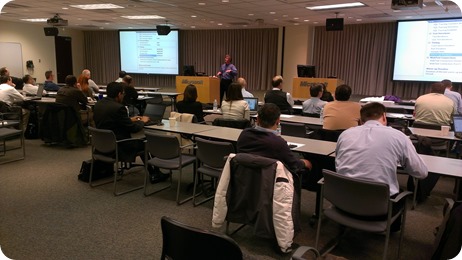
Yesterday’s Microsoft event in Cleveland was just as successful as the Columbus event! Both had 30+ attendees, and both had lots of great questions - expect a future blog post where I address some of the most interesting questions asked.

IMAG0616
Randy Pagels discussing SharePoint Web and Unit Testing with Visual Studio 2012; Cleveland, Ohio

Tuesday, March 5, 2013

SharePoint 2013 in Columbus, Ohio

Yesterday’s Microsoft event in Columbus was well attended.  And there’s still time to register for tomorrow’s Cleveland event. Hoping to see some of the Cleveland SharePoint User Group members in attendance tomorrow.

WP_20130304_001
Attendees at the “What’s New For Developers & Testers in SharePoint 2013” event, Columbus, Ohio

Friday, March 1, 2013

What’s New for Developers & Testers in SharePoint 2013

Next week, I’ll be co-presenting with Randy Pagels (Developer Technology Specialist for Microsoft) in a multi-city roadshow event focused on SharePoint 2013 and Visual Studio 2012:

Click to register

This event allows attendees to get up to speed on the new and improved development and testing features available in SharePoint 2013 using Visual Studio 2012. Some of the key learning areas include:

  • Understanding the Cloud App Model
  • Learning about core platform enhancements
  • Testing SharePoint performance with profiling tools
  • Testing SharePoint code with Microsoft Fakes Framework

Click below to register for an event near you:

March 4

Columbus, OH

March 12

Minneapolis, MN

March 6

Cleveland, OH

March 14

Des Moines, IA

March 7

March 11

Kansas City, KS

St. Louis, MO

March 15

Omaha, NE